Voice changer, MP3 player, DVD player, free screensaver voice changer, mp3 player, dvd player, free screensaver, music morpher, webcam morpher
Español  |  한국어  |  Italiano  |  Français  |  Deutsch  |  中文  |  日本語  |  English
Home | Products | Download | Add-on | Editor Reviews | Special Offers | Partner | News | Support | Community | Charity Program
FAQs on AV Webcam Morpher
 
QUESTIONS ABOUT INSTALLATION
     
FAQs ON WEBCAM MORPHER
+ General Questions
+ Questions About Installation
+ Questions About Usage And Problems
Support
FAQs
+ FAQs for Voice Changer Software
+ FAQs for Music Morpher
+ FAQs for Video Morpher
+ FAQs for Webcam Morpher
+ FAQs for Video Karaoke Maker
Tutorials
+ Tutorials for Voice Changer Software
+ Tutorials for Music Morpher
+ Tutorials for Video Morpher
+ Tutorials for Webcam Morpher
+ Tutorials for MP3 Player Morpher
+ Tutorials for Video Karaoke Maker
Products
+ AV Voice Changer Software
+ AV Music Morpher
+ AV Video Morpher
+ AV Webcam Morpher
+ VIP Store
+ Freeware
 
bullet QUESTIONS ABOUT INSTALLATION
Find answers to your questions regarding Webcam Morpher download, purchase, usages, plug-ins, and upgrades.

Tip of the day: go to http://www.freetranslation.com/ to translate this content to other languages.
Your Ad Here
2-1. What is the Protection Number? Where can I find it?
2-2. Why can’t I install AV Webcam Morpher on another computer?
2-3. Can I use the original license key to reinstall AV Webcam Morpher?
2-4. Despite copying and pasting exactly all information provided in the instruction email, I can’t complete the installation because of the error “Please re-enter correctly the information…”:
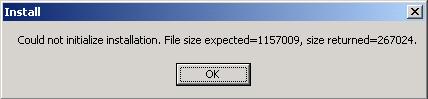
2-5. I can’t activate the installation due to the error “Could not initialize installation. File size expected = 1416160, size returned = 229376."
2-6. I can’t install AV Webcam Morpher because of the error: "You do not have access to make the required system configuration modifications."

Still cannot find the solution for your problem? Contact our Support Team here.

QUESTIONS ABOUT INSTALLATION

2-1. What is the Protection Number? Where can I find it?  Top

Protection Number is a security number unique on each computer. Once you have bought a license of AV Webcam Morpher, Protection Number is combined with your registered name and email address to generate a key for you to install the Pro Version. Therefore, it is essential that your Protection Number be provided correctly so that the Serial Number can be accepted upon installation.

To find the Protection Number of your computer please just click on the link below: http://www.audio4fun.com/download/vcs_protection_number.exe


- Click Run to continue

- Confirm Run again
- Click Copy to Clipboard to copy (do not type) your PC's Protection Number and send it to us


2-2. Why can’t I install AV Webcam Morpher on another computer?  Top

Due to security reasons and our End-User License Agreement, the Serial Number that you receive from us can only be used on 01 computer bearing the corresponding Protection Number. Yet, we are always willing to produce one more license key for customers having 02 computers so that they can fully enjoy the software. Thus, please let us know if you would like to install AV Webcam Morpher on your second PC.

If you want to set up VCS on 03 computers or more, please place one more order. Depending on the number of licenses you need, we will offer you a suitable discount.

2-3. Can I use the original license key to reinstall Webcam Morpher?  Top

Normally, the Protection Number will stay the same no matter how many times you reformat the computer. So you can use the original license key to reinstall WCM.

However, the Protection Number will change when you have a new computer, replace your mainboard, or when the BIOS information is updated. Please do not worry. Whenever you need help, simply let us know so that we can support you.

2-4. Despite copying and pasting exactly all information provided in the instruction email, I can’t complete the installation because of the error “Please re-enter correctly the information…”:  Top


If you provide a wrong Protection Number, the Serial Number will be created incorrectly and can not complete the installation. Regarding your problem, please try again as follows:

- Download the "vcs_protection_number.exe" file from here and open it to find the correct Protection Number of your computer.

- Copy exactly and send us this number so that we can generate a correct key for you to activate the Pro Version.

2-5. I can’t activate the installation due to the error “Could not initialize installation. File size expected = 1416160, size returned = 229376."  Top

Because your download is interrupted due to a network problem, the file size is not enough for installation to be activated. So please try again to download the setup file. During the download, remember to close all other running applications (even instant messengers) to optimize the process and avoid download interruption.

If the problem still persists, it is recommended that you should try downloading the program from another computer (a public PC). Then, copy it on a USB/Flash disk and transfer it onto your PC. Otherwise, you can try this tip to troubleshoot the download with Flashget:
http://mp3-player.audio4fun.com/Troubleshoot-the-download.htm.

2-6. I can’t install VCS because of the error: "You do not have access to make the required system configuration modifications." Top

Regarding this problem, simply restart your computer and install the software again. However, it is recommended that you download the latest version of WCM for a better performance.

About Us  |   Privacy Policy  |   Contact Us  |   Link  |   Site Map