Innovative Tool for Online Game Chat!


How to Create & Save & Load Nickvoice by yourself?


  Select a Pre-setting nickvoice
     
 
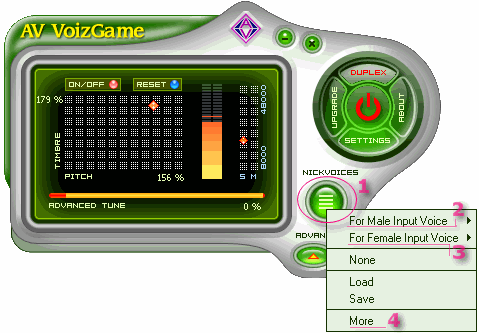
1. Run AV VoizGame

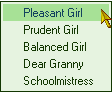
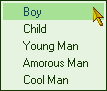
2. Click on Nickvoice (1). A menu then comes up like the image on the left.

3. If you are Male, select For Male Input Voice (2)


4. And, if you are a Female, please just go for For Female Input Voice (3)


Otherwise, click on More (4) to download more nickvoices from Audio4fun sites.

 
  Adjust the settings
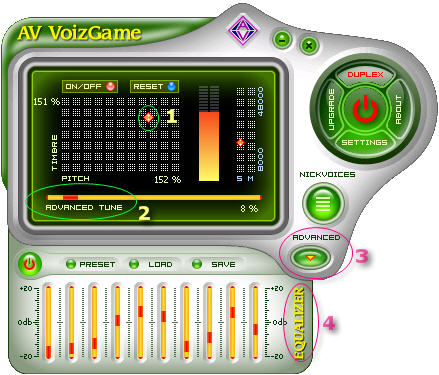
  1. Moving the Pitch and Timbre Cursor (1) around as your desire.

2. Set the Advanced Tune (2) close to Zero for a better performance.

3. Also, click on Advanced button (3) for more settings.

4. Adjust the Equalizer Bar (4) to improve the nickvoice or just leave it as Preset.


  Save settings as a nickvoice and load it again
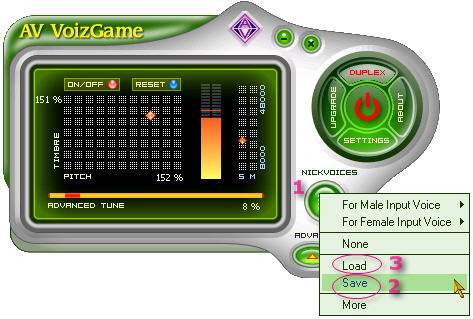
  1. Click on Nickfaces button (1) again.

2. Select Save (2) and locate the destination folder for the nickvoice to be saved.

If the nickvoice is saved successfully, it will be a *.nvc file.

4. To load the nickface that you created, just simply click on the Nickfaces button (1) one more time.

Then, point to the nickvoice (*.nvc file) and load it out.


AWARDS

AV VoizGame | Order | Benefits | Features | Tutorials | Customer Care | Audio Video Software
Community | Promotion | Holiday | Forum | Funny Ringtones | Funny Stuff | Funny Sounds | Remix CD